Files
After logging into Keycyte PAM in the user interface, you can view the servers and systems shared with you in the left menu. Having a server or system shared with you does not mean you can directly use it. You also need to have an identity shared with you to access that server.
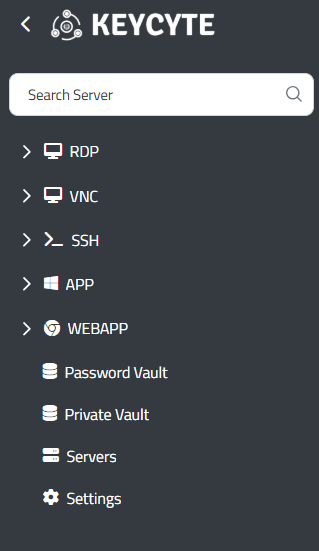
Figure-1
You can view the servers shared with you in an expandable tree structure separated by protocol as shown in Figure-1.
Supported Protocol Types
Different connection protocols are categorically organized in the Keycyte PAM user interface. Each protocol type is visually differentiated with its own icon to optimize user experience.
RDP (Remote Desktop Protocol)
This is the standard remote desktop connection protocol for Windows-based servers. Under the RDP category, Windows Server systems, Windows 10/11 workstation machines, and terminal services are listed. Through this protocol, full graphical interface access is provided, allowing you to work on the target system as if you were on a local computer.
VNC (Virtual Network Computing)
This is a platform-independent graphical desktop sharing protocol. It is used for remote management of Linux, Unix, and other systems with graphical interfaces. The VNC protocol is preferred in situations where network conditions are limited due to its ability to work even with low bandwidth.
SSH (Secure Shell)
This is a secure terminal access protocol for Linux, Unix, and network devices. Under the SSH category, Linux servers, network switches, routers, and other command-line based systems are included. Through this protocol, both interactive shell access and secure file transfer operations can be performed.
APP (Application Launcher)
This is a protocol designed for launching all Windows applications with .exe extensions individually. Database connections can be established under this protocol. Username and password fields are automatically filled for database access, and users can perform their logins without needing to know the passwords for these connections.
WEBAPP (Web Application Access)
This is the protocol used for secure access to web-based applications. Under this category, management panels with web interfaces, cloud services, and other HTTP/HTTPS-based applications are listed. Keycyte PAM's robot running on Chrome automatically fills in the username and password in web applications, clicks the login button, and users can access the web application without seeing the password information.
Access Control and Security
The visibility of each menu item is dynamically determined by the roles and authorizations assigned to you. Systems for which you do not have authorization are automatically hidden, and access attempts are logged by the system. This approach supports the zero trust security model by implementing the principle of least privilege. If you have access authorization to systems but do not have a shared identity, the system will be shown in the menu, but you will not be able to perform the login process since you do not have the required identity for access.
During the connection process, the PAM system automatically selects the appropriate credentials and establishes a secure connection to the target system. All session activities are recorded and can be reviewed for audit purposes when necessary.