Identities
In this section, we will examine the selection process of authentication accounts you will use when accessing a server or system. In Keycyte PAM, each user is assigned predefined credentials for specific servers, and you can select among these identities during the connection phase.
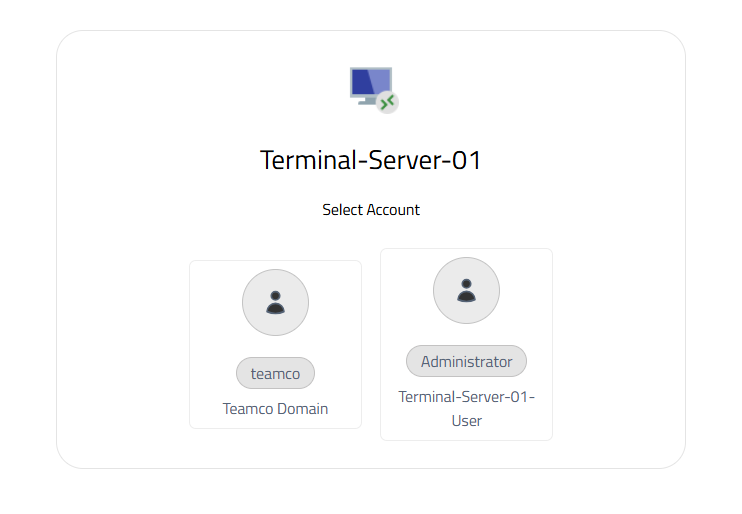
Figure-1
Identity Selection Process
When you want to connect to a server, the "Select Account" window opens as shown in Figure-1. In this window, all valid identity accounts shared with you are displayed. Each identity is categorized with visual icons and descriptive labels.
The identity selection interface is designed to optimize user experience. Visual distinction is provided by using different icons for each account type, and account information is clearly labeled. This way, you can quickly identify the correct identity and minimize the risk of wrong account selection.
Identity Types and Categories
Domain Accounts
These are Active Directory or LDAP-based authentication accounts in domain-integrated systems. The account shown with the "Teamco Domain" label under the "teamco" user in Figure-1 is an example of this category. Domain accounts typically provide wide access to corporate network resources and are subject to central management policies.
Local System Accounts
These are user accounts defined locally on the target system. Accounts shown with labels like "Administrator" and " Terminal-Server-01-User" belong to this category. Local accounts contain special authorizations for specific servers and are generally used for system administration or special application access.
Service Accounts
These are special accounts designed for specific services or applications to run. These accounts are typically configured with limited privileges and optimized for specific tasks.
Automatic Identity Mapping
The Keycyte PAM system automatically filters appropriate identity options for you based on the role definitions in your user profile and access policies predefined by your administrators. Identities for which you do not have authorization or that are not suitable for your usage scenario are not displayed in this list. This approach both enhances security and simplifies user experience.
When selecting an identity, the system considers the authorization level and access scope of the selected account. In accordance with the principle of least privilege, it is recommended that you select the most appropriate identity for the operation you will perform.
Security and Audit
Every identity selection and connection attempt is logged in detail by the PAM system. These records include which user accessed which system with which identity, access time, and session duration. Audit records are critically important for compliance requirements and security analyses.
Identity information is stored encrypted in the PAM vault, and users cannot directly see this information. During the connection process, identity information is automatically transmitted to the target system, eliminating the need for users to know passwords. This approach both enhances security and eliminates password management complexity.
Connection Process
After selecting the appropriate identity, Keycyte PAM automatically establishes a connection to the target system using the selected credentials and provides you with the appropriate protocol interface. If activated, all screen and keyboard keystrokes are recorded throughout the connection process.