Password Vault
This section will explain how to define passwords that you will use when accessing all servers and systems added from the Server Management section in Keycyte PAM.
When creating a password vault, you can select account type from the dropdown menu, password policy (if defined), domain, username and password information, along with the server or servers you want to use this password vault for.
Creating Password Vault
To create a new password vault, you can access the password vault creation form by clicking the "Add" button at the top of the page. Form fields change dynamically according to the selected account type.
Common Form Fields
Common fields present in all account types are:
- Type: Account type selection (Windows, Linux, MySQL, etc.)
- Name: Descriptive name for the password vault
- Policy: Password policy selection (optional)
- Username: Username to be used on the target system
- Password: Secure password information
- Roles: Individual or bulk authorization with password roles
- Servers: Server selection where this password vault will be used
- Server Roles: Individual or bulk authorization with server roles
- Description: Password vault description
Account Type Specific Fields
Additional fields are displayed according to the selected account type:
- Windows Domain: Domain information field is added
- Linux: Private Key and Passphrase fields are added (for SSH key authentication)
- Other Account Types: Standard form fields are used
Form fields are automatically updated after account type selection, providing configuration options suitable for the relevant account type.
Supported Account Types
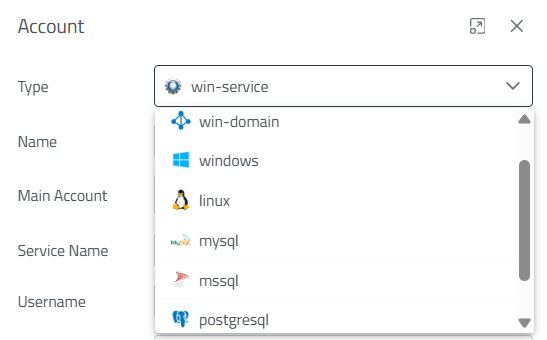
Figure-1
When creating a new password vault, the appropriate account type for the system type should be selected from the account types shown in Figure-1. Each account type supports different connection protocols and usage scenarios:
Account Type Descriptions
- Windows Domain: Domain accounts for Windows servers in Active Directory environment
- Windows: Standalone Windows systems and cross-platform remote desktop connections
- Linux: Terminal access for Linux/Unix based systems
- MySQL: Special access for MySQL database servers
- MsSQL: Microsoft SQL Server database connections
- PostgreSQL: PostgreSQL database systems and web applications
- Windows Service: Windows services and third-party applications
Password Policy Integration
Security actions such as automatic password changing, password complexity control, and password expiration management can be applied to created password vaults according to the password policies you have previously determined.
Password Vault Management
Editing, deletion, and authorization operations can be performed on created password vaults. Each password vault is associated with specific servers, ensuring that users can only access systems they are authorized for.

Figure-2
Password Vault Operations
The operations shown in Figure-2 can be performed with the Action menu in each password vault row. These buttons perform the following operations respectively:
- Edit: Edit and update password vault information
- Password Copy: Securely copy password information to clipboard
- Change Password: Automatically change the existing password according to a determined policy if one exists
- Manual Change: Manually change the password on the target system according to a determined policy if one exists, or directly with the entered password if not
- Verify: Check password correctness
- History: View password change history
- Owners: Manage password vault owners
- Delete: Permanently delete password vault
Password History Management
Keycyte PAM maintains change history for each password vault for password security and traceability purposes. Up to the last 10 password changes can be viewed with the History option. Through this feature:
- Password change history can be tracked
- Previous password information can be accessed when necessary
- Effectiveness of password policy applications can be evaluated
- Detailed records can be kept for security audits
These historical records are particularly critically important in automatic password changing processes and ensure continuous monitoring of system security.