
Keycyte PAM 3.2 · User Guide
Connecting with a Native Client
Instead of the browser terminal, you can connect to SSH servers with your own SSH client, for example OpenSSH, PuTTY or Windows Terminal. The connection runs through the Keycyte PAM SSH proxy, which signs you in to the target server with the selected account. You never see the password of the target account.
Before You Begin
- The server must be an SSH server in your server tree, and an account must be assigned to you for it.
- Your computer must be able to reach the Keycyte PAM server on TCP port
2222. - You need your Keycyte PAM user name and password, and your MFA code if MFA is enabled for your account.
SSH Command Format
The command has the following format:
ssh <vaultId>@<serverId>@<pamUser>@<pamHost> -p 2222| Part | Description |
|---|---|
<vaultId> | The ID of the account (vault entry) to connect with. |
<serverId> | The ID of the target server. |
<pamUser> | Your Keycyte PAM user name. |
<pamHost> | The host name of your Keycyte PAM server, for example pam.example.com. |
-p 2222 | The port of the Keycyte PAM SSH proxy. This is not the SSH port of the target server. |
For example:
ssh 1042@317@jdoe@pam.example.com -p 2222You do not need to look up the IDs: the Client Panel builds the command for you.
Copying the SSH Command
To copy the SSH command:
-
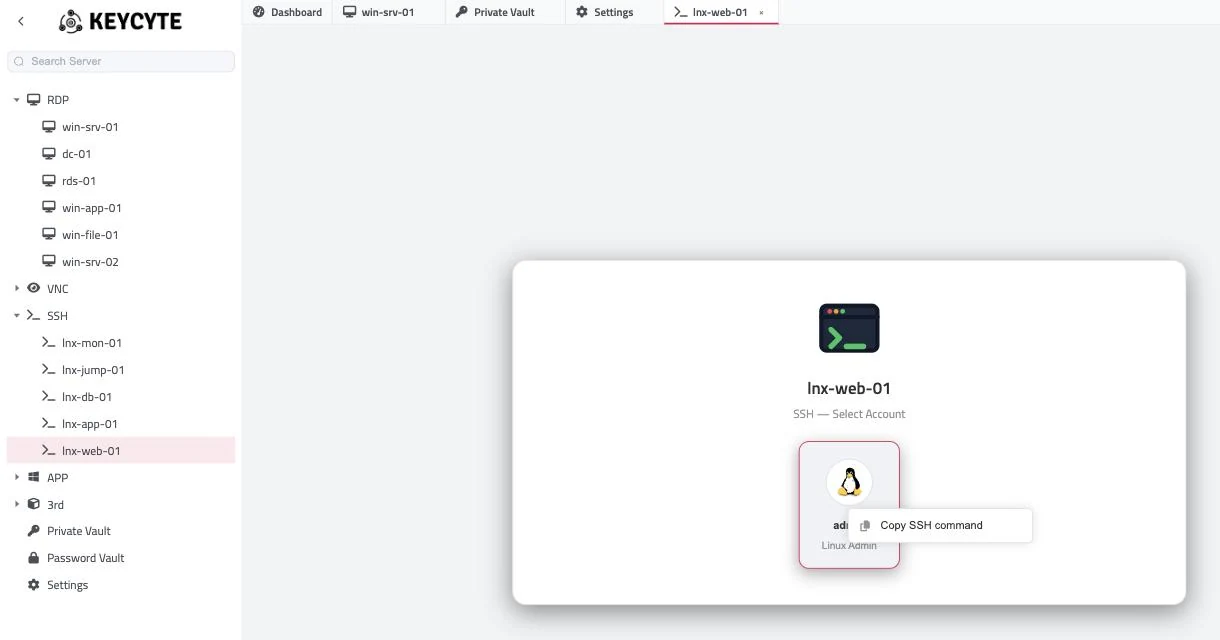
In the server tree, click the SSH server.
The account selection card opens.
-
Right-click the account that you want to use.
-
Click Copy SSH command.
The command is copied to your clipboard and the message SSH command copied to clipboard is shown. If your browser does not allow access to the clipboard, the command is shown in a dialog so that you can copy it manually.
Note
The host name in the command is the address that you used to open the Client Panel. If your SSH client must use a different address to reach Keycyte PAM, edit the part after the last @.
Connecting with the SSH Command
To connect:
- Open a terminal or your SSH client.
- Paste the command and run it.
- When prompted for a password, enter your Keycyte PAM password, not the password of the target account.
- If MFA is enabled for your account, enter your MFA code when prompted.
The session to the target server opens in your SSH client.